ZFS, BTRFS, and LVM in the Homelab: Picking a Filesystem Without Regret
Every Proxmox homelab arrives at the same fork: ZFS, BTRFS, or LVM. The marketing pages make them sound interchangeable. They are not. Each wins a different argument, and each has a gotcha that only shows up once data is already on it. Here is the short version.
This one’s a living post — updated since it first went up to fold in recent ZFS developments, most importantly OpenZFS 2.3’s RAIDZ expansion (below).
ZFS — the best software RAID for active workloads
ZFS is the strongest choice for data integrity, and the best software RAID available for a homelab running live workloads. End-to-end checksums catch silent corruption, snapshots are instant and cheap, send/receive makes replication trivial, and RAIDZ has no write hole. For a Proxmox box running containers and VMs — data that changes constantly — nothing else in this list competes.
One thing worth setting straight, because it gets repeated as a complaint: the ARC eating RAM is not a flaw. ARC is ZFS deliberately using otherwise-idle memory as read cache, and it releases that memory back under pressure. If you are running ZFS, you are choosing to trade RAM for read performance — that is the deal, not a surprise. It is tunable (zfs_arc_max) if you want to bound it for a VM-heavy host, but it is a deliberate design, not a gotcha.
The real things to know: ZFS is copy-on-write, so it fragments over time and slows once a pool passes ~80% full — leave headroom. The old complaint that you couldn’t grow a RAIDZ array by one disk is now fixed: OpenZFS 2.3, stable since January 2025, added RAIDZ expansion, so you can attach a single drive to a live RAIDZ pool — though data written before the expansion keeps its old parity ratio until rewritten. It also prefers raw disks over hardware RAID, and ECC RAM if you are being strict.
Use it when: integrity matters and the data is active — containers, VMs, databases, anything that changes. This is the default for a working Proxmox host.
BTRFS — great features, one sharp edge
BTRFS gives you most of the ZFS feature list — checksums, snapshots, copy-on-write, cheap subvolumes — and lives in the mainline kernel, so there is no out-of-tree module to track. For single-disk or mirrored setups it is genuinely solid and lighter on memory than ZFS.
The sharp edge is parity RAID. BTRFS RAID5/6 still carries the write hole, and the official BTRFS status page still lists RAID56 block-group profiles as unstable. This is not old news that got quietly fixed — the kernel is moving toward discouraging you outright when you create a RAID5/6 array, and Debian has shipped a mount-time warning calling RAID5/6 experimental since 2017. The rule is simple and worth tattooing on the wall: BTRFS for single disk, RAID1, or RAID10 is fine; BTRFS for RAID5/6 is asking for a bad night. If you want parity with integrity, this is not your filesystem — use ZFS RAIDZ instead.
Reputation aside, BTRFS can also get into awkward states when a volume hits full, and balancing a near-full array is slower and more fragile than the ZFS equivalent.
Use it when: you want snapshots and checksums on a single disk or a mirror, prefer an in-kernel option, and have no need for parity RAID.
LVM — boring, fast, and predictable
LVM is not a checksumming filesystem at all — it is volume management. No bitrot detection, no built-in integrity. What it offers is thin provisioning, flexible resizing, and the lowest overhead of the three. For virtualization specifically, LVM-thin hands VMs raw block devices with near-native performance and none of the copy-on-write write amplification that ZFS and BTRFS impose — which is exactly why Proxmox uses LVM-thin as a default local storage option.
That performance is the whole pitch. If the workload is VM disks where raw throughput and predictable latency matter more than self-healing, LVM-thin is often the fastest option on the same hardware.
The gotchas are about what it does not do. LVM snapshots are not the free, keep-hundreds model people expect from ZFS — classic LVM snapshots degrade write performance while active, and thin snapshots, while much better, still are not equivalent. There is no checksumming, so silent corruption goes undetected unless something above LVM is watching for it. And if you put LVM on top of mdadm soft-RAID, the classic RAID5 write hole applies unless you close it with a stripe journal or PPL (partial parity log) — a write-intent bitmap only speeds resync, it doesn’t shut the hole — so “LVM on RAID5” inherits the same parity caveat people pin on BTRFS, just one layer down.
Use it when: the priority is VM performance and operational simplicity, and integrity is handled elsewhere (or the data is reproducible).
A note on SnapRAID, DrivePool, and unRAID
Worth naming the other family, because people reach for these and then wonder why they struggle with containers. SnapRAID, Stablebit DrivePool, and unRAID’s classic array are not really competitors to ZFS for a working host — they solve a different problem. They pool mismatched disks and compute parity on a schedule or per-disk, which is excellent for static media: a Plex library, archives, backups, anything that mostly sits still and grows slowly. Mixed drive sizes, add-a-disk-anytime flexibility, and only spinning up the disk you need are real advantages there.
The trade is that they are poor for active workloads. SnapRAID’s parity is point-in-time, not real-time — changes since the last sync are unprotected, which is fine for media and dangerous for a database. unRAID’s single-disk-at-a-time array writes slowly and was never meant to back busy VMs. The honest progression for a lot of homelabbers is exactly this: start on SnapRAID or DrivePool for the media pile, try unRAID for the all-in-one convenience, and then move the active container and VM storage to ZFS once it becomes clear those tools were built for data that does not change every second. Use them for the archive. Use ZFS for the work.
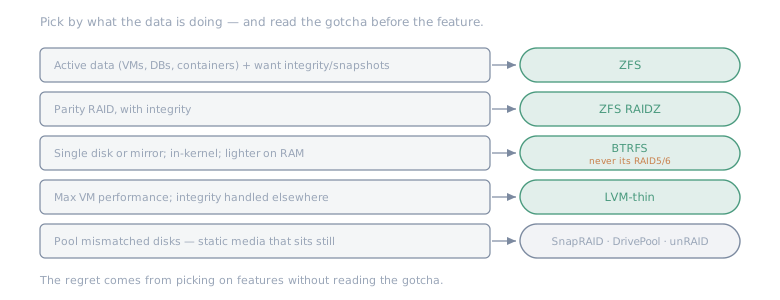
Match the tool to what the data is doing — and read the gotcha before the feature.
- Want integrity, snapshots, replication on active data (containers, VMs, databases)? ZFS — the best software RAID here.
- Want snapshots/checksums on a single disk or mirror, in-kernel, lighter? BTRFS — but never its RAID5/6.
- Want maximum VM performance and simplicity, integrity not the point? LVM-thin.
- Need parity RAID with integrity? ZFS RAIDZ. Not BTRFS parity, and not bare mdadm-without-journal.
- Pooling mismatched disks for static media that sits still? SnapRAID, DrivePool, or unRAID’s array — not for active workloads.
The mistake that causes regret is not picking the “wrong” one — it is picking on features without reading the gotcha. BTRFS parity will eat your data, LVM will quietly let bitrot through, and the JBOD parity tools will leave your live data unprotected between syncs. Choose the one whose downside you can live with, and match the tool to whether your data sits still or moves.
Try it
Adjust the drive counts and sizes to compare the usable space, parity overhead, write penalties, and disk failure tolerance limits of different configurations across ZFS, BTRFS, and LVM Thin. (Open it full-page.)
More on Systems tinkering LVM Thin Pools in Proxmox →